Privacy Policy Acceptance
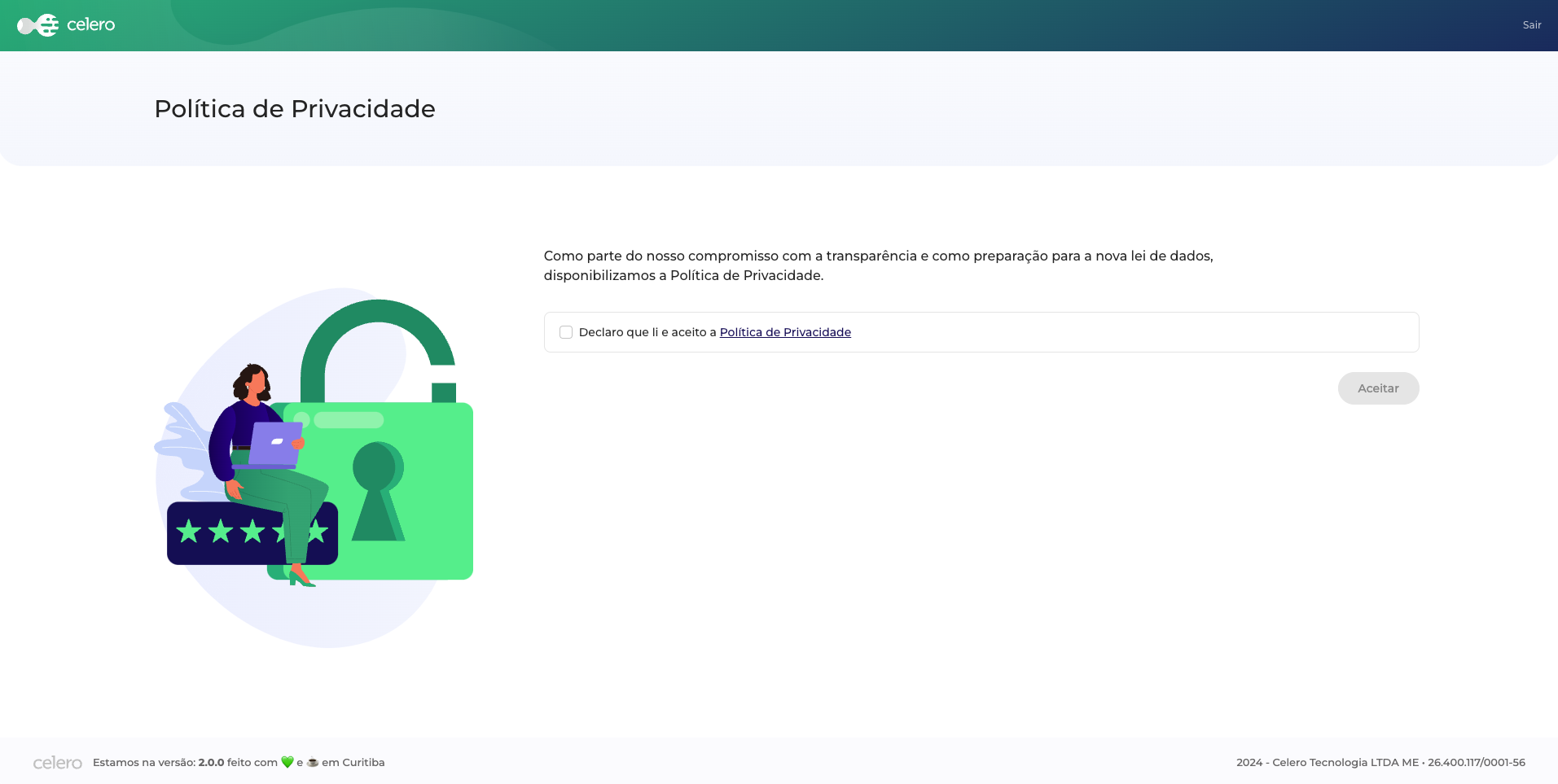
The Privacy Policy Acceptance component is a simple component that allows you to display a privacy policy and ask the user to accept it. This component is useful when you want to make sure that the user has read and accepted your privacy policy before they can proceed.
Users access this page only when they first log in to the application. After accepting the privacy policy, the user is redirected to the application's home page. If the privacy policy updates, the user should be redirected to the privacy policy page to accept the new terms.
Suggested route path
The example bellow follows angular 17 standards. To a better understanding of how to use or import them, please refer to the Angular documentation.
We suggest the following route path structure:
- Router
- Module
import { BfmPrivacyPolicyAcceptanceComponent } from "@celerofinancas/ui-auth";

export const AUTH_ROUTES: Route[] = [
  {
    path: "privacy-policy",
    component: BfmPrivacyPolicyAcceptanceComponent,
  }
  // ...
];
  export const ROUTES: Route[] = [
    {
      path: 'auth',
      loadChildren: () => import('./auth/auth.routing').then(mod => mod.AUTH_ROUTES)
    },
    // ...
  ];
BfmPrivacyPolicyAcceptanceComponent
This section describes the BfmPrivacyPolicyAcceptanceComponent component.
Composition
The BfmPrivacyPolicyAcceptanceComponent component is composed of the following elements:
- BfmPrivacyPolicyComponent - A component that displays the privacy policy.
Usage
To use the BfmPrivacyPolicyAcceptanceComponent, you need to import it in your component:
- Angular
- Web Component
import { BfmPrivacyPolicyAcceptanceComponent, BfmPrivacyPolicyComponent } from "@celerofinancas/ui-auth";

@Component({
  standalone: true,
  selector: 'bfm-privacy-policy-acceptance',
  imports: [
    BfmPrivacyPolicyAcceptanceComponent,
    BfmPrivacyPolicyComponent
  ],
  templateUrl: './privacy-policy.component.html',
})
export class PrivacyPolicyComponent {}
Then, you can use the BfmPrivacyPolicyAcceptanceComponent in your template:
<bfm-privacy-policy-acceptance
  [logo]="logo"
  [signOutText]="signOutText"
  [hasAccepted]="hasAccepted"
  [showUseTerms]="showUseTerms"
  [downloadTermDescription]="downloadTermDescription"
  [acceptTermDescription]="acceptTermDescription"
  [privacyPolicyImage]="privacyPolicyImage"
/>
To use a web component, make sure that you have imported the javascript file in your HTML file. For more information, follow the Web components guide.
Also, have followed the Web Component Configuration guide.
If you want to use the BfmPrivacyPolicyAcceptanceComponent as a web component, you can import in your HTML file as follows:
<bfm-privacy-policy-acceptance/>
Inputs
The BfmPrivacyPolicyAcceptanceComponent has the following inputs:
logo
The image displayed in the page.
- Accepts a string in cdsSource pattern.
| Type | Default |
|---|---|
string | assets/terms/privacy-policy.svg |
signOutText
The text to be displayed on the accept button.
| Type | Default |
|---|---|
string | Sair |
hasAccepted
Weather the user has already accepted the policy
| Type | Default |
|---|---|
boolean | false |
showUseTerms
Controls whether the user terms are displayed.
| Type | Default |
|---|---|
boolean | false |
downloadTermDescription
Text to show in the download button
| Type | Default |
|---|---|
string | Baixar termo |
acceptTermDescription
Text to show in the accept button.
| Type | Default |
|---|---|
string | Aceitar |
privacyPolicyImage
Image to show in the privacy policy section.
| Type | Default |
|---|---|
string | assets/terms/privacy-policy.svg |